In order to access the settings, Open the menu on your MAPTATTOO and select its last Entry (“Settings”).
You will be presented with a screen that shows the settings that can be updated.
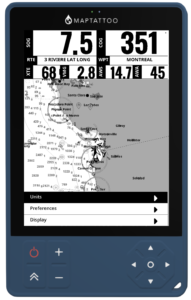
The following sub-categories are available:
- Display (personalize the widgets being displayed, only on MAPTATTOO PRO)
- Preferences
- Units
In order to adjust a setting, navigate to it with the “UP” or “DOWN” keys on your directional keypad
The settings can be adjusted using the “LEFT” or “RIGHT” keys on your directional keypad.
Units #
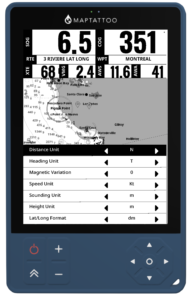
The following settings can be adjusted:
- Distance Unit: select the unit in which distances, such as distance to a waypoint, are presented on the screen
- Heading Unit: Select Geographic (T: True) or Magnetic (M: Magnetic)
- Height Unit: select the unit in which features such as lighthouse are represented on the chart
- Speed Unit: Select the speed Unit (kt, kph, mph, m/s)
- Sounding Unit: select the Sounding Unit (m, ft)
- Lat/Long Format: Select the desired format for waypoint or route point entries: d (ex: N 47.77267°), dm (ex: N 47°26.8287′) or dms (ex: N 47°26’45”)
Preferences #
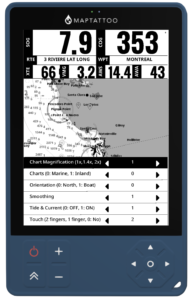
The following settings can be adjusted:
- Chart Magnification: adjust the magnification to prioritize the details or readability at a distance.
- Charts: Choose “0” to prioritize Marine Charts, “1” for Inland Lake Charts
- Orientation: Select “0” for True North Up or “1” for Course/Arrow up. When selecting Arrow-up and if the boat speed is greater than 1 Kt, the chart will orient to keep the arrow pointing up when centered (press the “Center” key to activate the auto-center mode. The compass rose indicates the True North. The arrow will center itself at about a third of the screen height at the bottom (see screenshot below).
- Smoothing: You can now add a smoothing function to reduce noise in the speed and heading readings. Select 1 for no smoothing to 8 for high smoothing factor (and lower reactivity)
- Tide & Current: Select “1” to enable tide and current in your zone.
- Touch: Deactivate touch (by selecting the “0” entry) when the conditions are rough and drops of water are causing some issues.
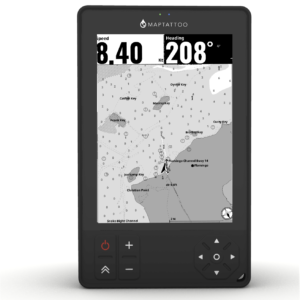
Display (** New in firmware 254.0.0 for MAPTATTOO PRO**) #
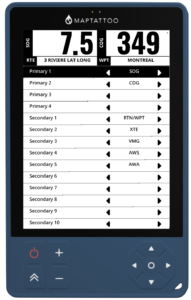
You can customize the data presented on your screens by assigning data to primary (large) or secondary (small) widgets.
Data shown with (*) is only available through the Bluetooth Gateway and on the MAPTATTOO PRO if your NMEA 2000 streams that information.
Navigation & Position Data #
- SOG (Speed over ground) – Boat’s speed relative to the ground in knots
- COG (Course over ground) – Direction of travel relative to the ground in degrees
- (*) STW (Speed through water) – Boat’s speed relative to the water in knots
- (*) HDG (Magnetic heading) – Compass heading in degrees
- LAT (Latitude) – Current latitude position in decimal degrees
- LON (Longitude) – Current longitude position in decimal degrees
- DAT/TIM (Date/Time) – Current Date / Current Time
- TSG (Top Speed) – Top speed, over ground
- MTM (Moving Time) – Moving time
- IDL (Idle Time) – Time idle
- DST (Distance traveled) – Distance traveled since last reset
Wind Data #
- (*) AWA (Apparent wind angle) – Wind angle relative to the boat in degrees
- (*) TWA (True wind angle) – Actual wind angle corrected for boat movement in degrees
- (*) AWS (Apparent wind speed) – Wind speed as measured on the boat in knots
- (*) TWS (True wind speed) – Actual wind speed corrected for boat movement in knots
Environmental Data #
- (*) DBT (Water depth) – Depth below transducer in meters
- (*) AIR (Air temperature) – Ambient air temperature in °C
- (*) WTR (Water temperature) – Sea water temperature in °C
Routing #
- RTN (Route Name) – Name of the selected route
- WPT (Waypoint Name) – Name of the next waypoint
- BTW (Bearing to Waypoint) – Bearing to the next waypoint
- DTW (Distance to Waypoint) – Remaining Distance to Waypoint
- XTE (cross-track deviation) – Angle between your heading and the bearing to the next waypoint)
- VMG (Velocity Made Good) – Projected Speed relative to next waypoint direction
- TTR (Time to Route) – Time to Complete the route assuming average speed
- TTW (Time to Waypoint) – Time to get to next waypoint assuming average speed
- RDT (Remaining Distance) – Remaining distance on current route